
Troubleshooting for Xlite
In case you have issues with accessing to X-lite or shows any error, follow the next steps:
1. Turn on the VPN
2. Login to Vici (Link depends on which server the user is located)
3. Open Xlite:
- Click on the arrow-down on the X-lite app, see the image below as reference:
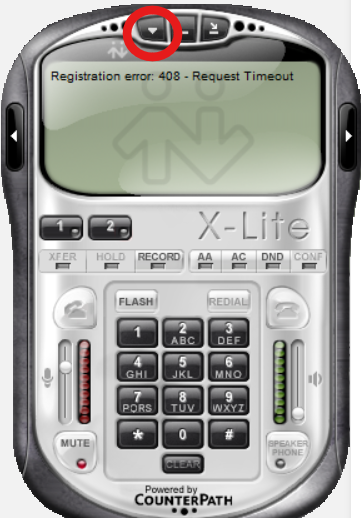
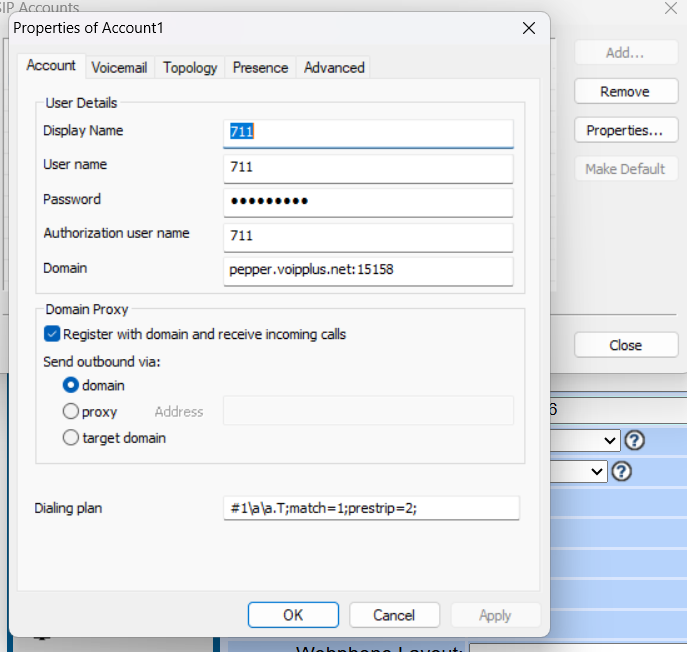
- Access to the option "SIP account settings"
- Click on Properties
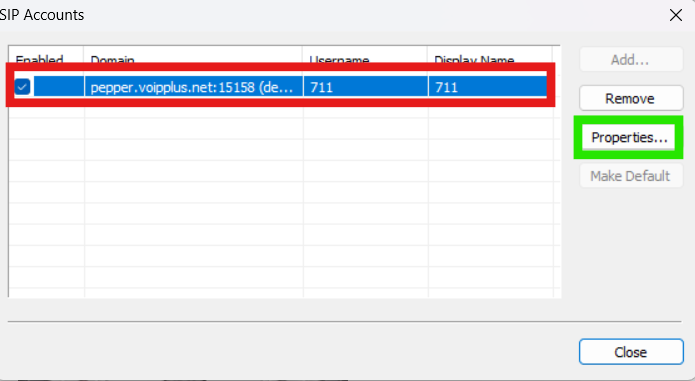
As for links they should use, it follows this logic:
If xlite domain is 68.70.169.165:15158, they should login to: http://orange.voipplus.net:8441/dynamic.php
If xlite domain is 68.70.169.172:15158, they should login to: http://Avocado.voipplus.net:8441/dynamic.php
If xlite domain is 68.70.169.176:15158, they should login to: http://pepper.voipplus.net:8441/dynamic.php
If the steps are properly followed, no error should show on X- lite.
No comments to display
No comments to display